
Rapid AI Voice Agent Development with Vapi, Make, and MCP
Introduction and Approach
This project explored how quickly a practical AI voice agent could be built for front desk automation without creating a fully custom telephony and backend stack. The goal was to reduce repetitive manual work, extend service availability beyond business hours, and validate whether conversational AI combined with workflow automation could deliver a reliable prototype with minimal infrastructure overhead.
To keep development fast, the solution used a low-code-first architecture: Vapi handled real-time voice interactions, while Make handled workflow automation and post-call processes. A lightweight MCP server was added as a controlled integration layer for dynamic data retrieval during live conversations, enabling the assistant to access contextual information when static prompts were not enough.
Using ready-to-use tools significantly shortened the development cycle. Instead of building custom telephony, workflow orchestration, and service integrations from scratch, the focus could shift entirely to conversation design and configuration. With low-code platforms like Vapi and Make, a first working end-to-end prototype can realistically be built within a week.
What Was Built
The result of the project was an AI voice agent capable of handling basic front desk calls from end to end.
The agent could answer common questions, collect caller information, and decide when external data was needed during the conversation. For requests such as appointment availability, it used an MCP tool to retrieve structured data from an external source and respond to the caller with up-to-date information.
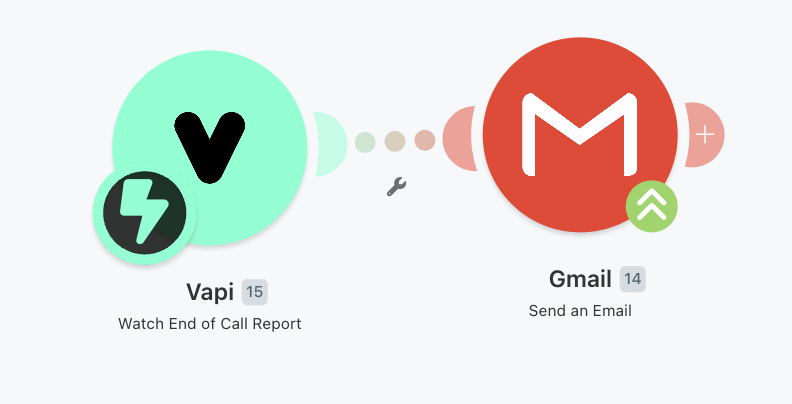
After each call, the system automatically generated a post-call workflow: Vapi sent an end-of-call report to Make, Make extracted the relevant call details, and Gmail delivered a summary email to the configured recipient.
In practice, this meant the prototype could receive a phone call, handle a simple caller request, retrieve dynamic data when needed, and notify the team with a concise follow-up summary after the conversation ended.
High-Level Architecture
At a high level, inbound or outbound calls are handled by the Vapi platform, which provides the core voice runtime: telephony integration, speech-to-text, language model orchestration, and text-to-speech. The agent was reachable through a phone number provisioned in Vapi, with the option to connect existing telephony infrastructure through providers such as Twilio.
Although Vapi simplifies the infrastructure layer, the assistant still requires careful configuration. The base prompt defines the agent’s role, tone, boundaries, and expected behavior, while the agent configuration controls how the system behaves during a live call. This includes provider selection, voice settings, turn-taking behavior, silence handling, interruption behavior, and tool availability.
For standard requests, the assistant responds directly from its configured prompt and available tools. When a caller asks for information outside the base prompt, the assistant invokes a custom MCP tool that retrieves relevant data from connected systems and returns structured results back to the conversation.
After the call ends, Vapi emits an end-of-call report event. This event is consumed by a Make scenario that orchestrates post-call automation, including optional enrichment, summary handling, and email delivery via Gmail. This separation keeps real-time call handling lightweight while moving reporting and notifications into asynchronous workflows.
From a systems perspective, the architecture was intentionally minimal. A key engineering decision was to keep the real-time call path as small as possible: Vapi handled the conversation runtime, the MCP server handled narrowly scoped data access, and Make handled asynchronous post-call work. This separation reduced latency risk during the live conversation and made each part easier to test and troubleshoot independently.

Connecting the Components
Once the high-level architecture was defined, the next step was wiring the individual services together: Vapi for the live call, MCP for dynamic data retrieval, and Make for post-call automation.
Connecting Vapi to the MCP Server
The MCP server exposes a small set of tools that the assistant can call during a live conversation. These tools are intentionally narrow and task-specific, such as checking appointment availability, or looking up customer context.
Each MCP tool was treated as a small data contract: it accepted a predictable input shape, validated required fields, and returned structured data that the assistant could safely use in a spoken response. This avoided placing dynamic business data directly in the prompt and reduced the risk of inconsistent answers.
In Vapi, the MCP server URL is configured as a tool available to the assistant. When the model decides that external data is needed, Vapi invokes the relevant MCP tool and passes the returned result back into the conversation.
When to Use the Prompt vs an MCP Tool
A practical configuration decision is deciding which information should live in the base prompt and which should be retrieved through an MCP tool during the call.
Use the prompt for | Use an MCP tool for |
Assistant role, tone, and boundaries | Appointment availability |
Service descriptions and FAQs | Customer account details |
Office locations and general business hours | Order or booking status |
Escalation rules and fallback behavior | Pricing or data that changes frequently |
Static information that rarely changes | Information that depends on the caller, date, location, or current system state |
A useful rule of thumb: if the information defines assistant behavior, keep it in the prompt. If it depends on live data or the specific call context, retrieve it through an MCP tool.
Example MCP Tool: Checking Appointment Availability
One example of an MCP tool used by the assistant is getAvailableSlots. The purpose of this tool is to retrieve available appointment times from an external scheduling system during the live call.
For example, when a caller asks, “Do you have any appointments tomorrow afternoon?”, the assistant can call the MCP tool with structured arguments:

The MCP server then queries the scheduling system and returns available slots:

Using this response, the assistant can answer naturally:
“Yes, we have two available consultation slots tomorrow afternoon: 1:30 PM and 3:00 PM at the Downtown Office.”
This keeps dynamic scheduling data outside the prompt while still allowing the voice agent to provide accurate, up-to-date answers during the call.
Connecting Vapi to Make
The post-call workflow starts when Vapi emits an end-of-call report. This event contains call metadata and conversation artifacts such as the transcript, messages, recording links, or generated summary depending on the configuration.
Make listens for this event using a Vapi webhook. Once received, the scenario extracts the relevant fields and prepares the data for downstream actions.
The Make scenario was responsible for mapping Vapi’s end-of-call payload into a clean email format. Only the fields needed for the report were extracted, such as caller details, transcript highlights, summary, and follow-up intent. This kept the automation focused and avoided passing unnecessary call data between modules.

Building the Make Scenario
The Make scenario is responsible for turning the raw call event into an actionable summary. A simple version of the scenario can follow this structure:

The final step is sending a concise summary to the relevant team member or shared inbox. In Make, this required adding one additional module: Gmail -> Send an email. The module was configured with the recipient, subject, and email body, using mapped data from the Vapi endof-call report.
The email can include the caller’s name, reason for calling, transcript highlights, collected information, and any recommended follow-up action.
Challenges and Limitations in AI Voice Agent Implementation
Building a real-time voice agent introduced several practical challenges. Most of them came from real conversational behavior, platform-level configuration, and the trade-offs of combining low-code tools with a lightweight custom MCP layer.
One of the main challenges was conversation reliability. Real callers interrupt, pause, change topics, and speak ambiguously, so the assistant needed to maintain context while deciding when to respond directly and when to trigger external tools via MCP.
Latency was another important factor. Even small delays are noticeable in a voice interface, which required careful tuning of turn-taking behavior, including endpointing strategy, interruption handling, and silence detection.
A significant part of the implementation was configuration work rather than traditional coding. Prompt design, tool availability, endpointing settings, silence timeouts, and interruption behavior all affected the final user experience. These settings had to be tested against realistic call scenarios because small changes could noticeably change the conversation flow.
Debugging also became more complex because the system spanned multiple tools. A single interaction could pass through Vapi, the MCP server, and Make, so troubleshooting often required tracing events across several independent systems rather than one codebase.
There were also limitations common to low-code AI systems. Platforms like Vapi and Make accelerate development, but they abstract away some low-level controls. This can make highly specific edge cases, advanced conversational behavior, or complex workflow logic harder to tune than in a fully custom implementation.
Finally, the system depends on external providers for voice runtime, automation, and integrations. Provider outages, API changes, pricing changes, or quota limits can directly affect reliability and operational behavior.
Overall, the approach worked well for rapid prototyping and early deployment, but production readiness still requires disciplined configuration, observability, fallback handling, and clear ownership of each integration point.
Summary
This project showed that a practical front desk AI voice agent can be delivered quickly using a low-code-first architecture with lightweight custom integrations. The prototype successfully automated repetitive interactions, improved after-hours availability, and reduced manual operational load without requiring a fully custom telephony stack.
At the same time, the implementation confirmed that production quality depends less on raw model capability and more on configuration, orchestration, and observability—especially in real-time voice scenarios. With stronger integrations, analytics, and escalation design, this approach can evolve from a fast prototype into a reliable, scalable support layer for customer-facing operations.
This is another example of AI Agent projects done at Apptimia. If you are looking for similar AI voice agent solutions for your business, where time-to-market matters, get in touch with us!.
Paweł K., Senior Software Engineer at Apptimia


